Place Components
Pick a Component from the build dock, put it on the Board with a click or the Enter key, and read what the game says when it refuses.
To place a Component, open a group in the build dock, pick the Component, and click the Board. The Node appears under your pointer and the Company pays its price.
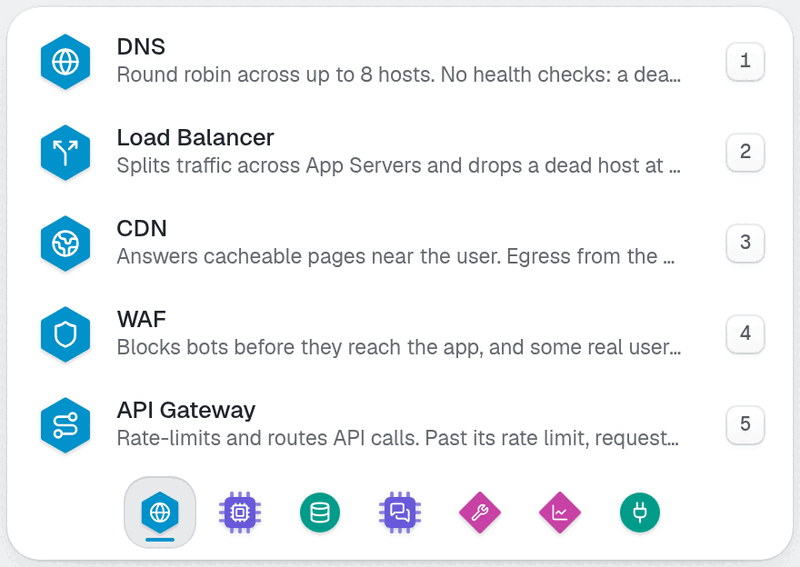
Look at the open list above the group icons. Each row shows a name, one line about it, a price, and a number key.
Place a Node#
Find the group icons in the build dock at the bottom of the screen. Hover one to read its name and number, such as Data (3).
Click a group, or press its number key. A list of Components opens above the dock.
Read the rows. Each shows the Component's name, a short line about it, and its price. A price in red means you cannot afford it now. A row with a lock names the research that opens it.
Click a row, or press its number key. The list closes. The dock now shows the Component's name, Click the board, and an X button.
Click an empty spot on the Board. The card appears centred on your pointer, and the Cash row on the HUD drops by the price.
Look at the right side of the screen. The Inspector opens on the new Node, because placing also selects.
Press Enter instead of clicking in step 5 to drop the part in the next free spot. That is the keyboard way to place.
A placed Node is not connected to anything yet. It carries no traffic until you add a Link, which is the next page, Wire Nodes with Links.
DatabasePostgreSQL or MySQLThe source of truth. Postgres forks a process per connection; MySQL gives each a thread.A Database as it looks on the Board right after you place it. Nothing is wired to it yet.
One part per pick#
The part in your hand is used up by one placement. To place a second Database, pick it from the dock again. This is on purpose, so a stray click on the Board never buys something.
To put a part back without placing it, press Esc or click the X button on the dock.
If the spot is taken#
You can click anywhere clear. If the spot overlaps a card, the Node slides to the nearest free place. You can drag it later: Move, select, copy, sell.
What the game refuses#
A refusal appears as a toast, and the part stays in your hand. Click a clear spot or press Esc.
| Message | Cause |
|---|---|
<Component> costs $<price>. | Your Cash is below the price. Wait, collect, or choose a cheaper part. |
Out of Cash: no placement, upgrade, or hire until Cash is above zero. | Cash is zero or below. Sell a Node or collect revenue first. |
<Component> needs <Research>. | The Component is locked. Open Research and study the item it names. |
Open that region first. | You tried to place in a region you have not opened. |
<Mutator>: no <Component>. | A Mutator on your Company bans that Component. |
Locked rows in the dock are not dead ends. Click one and the toast names the research.
Mistakes to avoid#
Do not leave a Node unlinked. A placed Node costs Cash and carries no traffic until you add a Link.
Do not click the Board twice to place twice. One pick places one Node.
Do not place before you read the price. The row turns red when Cash is short, and the toast repeats the price.
Undo is quick. Press
Zright after a wrong placement. Within 30 seconds the refund is exact. See Clock, undo, and saves.
Try it#
Place an App Server and a Database on the practice board below. Pick each from the dock on the board, then click the board to drop it. Nothing you do here touches a Company.
Next: Wire Nodes with Links.